See the big picture.
A map of your disk, sized by what is taking up space. Open it full screen and follow a folder all the way down.
 MacWash
Make room for the things you love creating.
Explore your storage, find what outstayed its welcome, and choose what comes next.
macOS 14.0+ · Built for Apple silicon Checking the latest release…Developer ID signed · Notarized by Apple · Installation guide
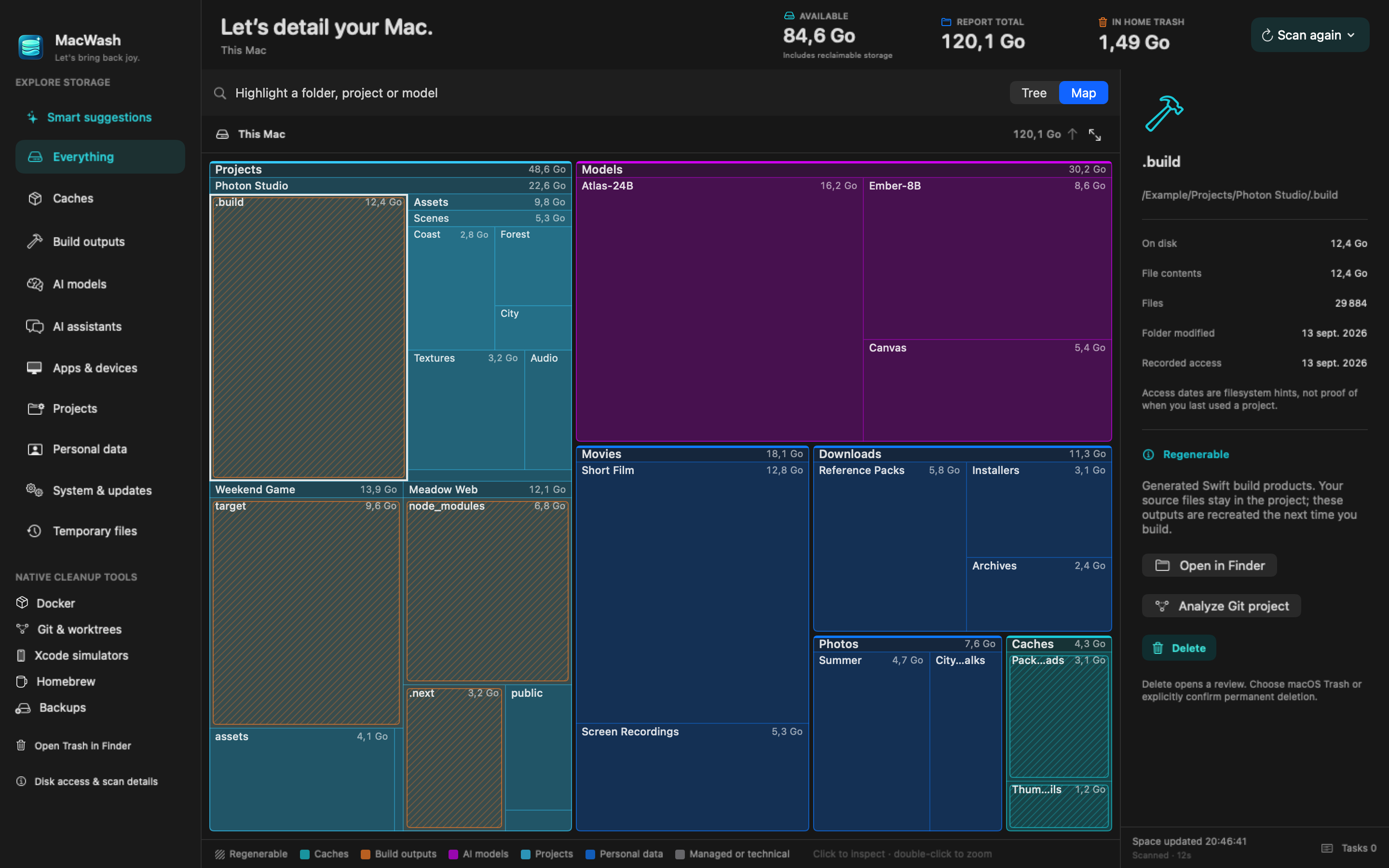
A map of your disk, sized by what is taking up space. Open it full screen and follow a folder all the way down.
Clean borders and lighter labels keep nested folders readable. Click to inspect. Double-click to explore.
Compact stats and a quieter toolbar keep the focus on your files. The details are there when you need them.
LESS GUESSWORK. MORE SPACE.
Dependencies, downloads, models, and mysterious giants. See what’s actually there before starting negotiations with your storage.
Find heavy dependencies, build outputs, Python environments, and agent worktrees—wherever your projects live.
Explore Hugging Face, LM Studio, and local model storage. See individual downloads before deciding what to keep.
Docker, Git, Homebrew, and Xcode cleanup runs through their own tools, with a review before changes.
Explore Downloads and iMovie data, or make verified backups in a folder you choose, with external disk recommendations.
Review captures, models, and older builds. Create smaller JPG or HEVC copies of screenshots and recordings while keeping the originals.
A CLEANER WITH A LITTLE CONSCIENCE
No surprise cleanups. No heroic guesswork.
You make the call. MacWash handles the queue.
Scan locally. Browse a size-sorted tree and see what each folder actually contains.
Review the exact item, its size, and cleanup notes. Protected roots and your home folder are off limits.
Trash is the default. Permanent deletion requires an explicit choice and confirmation. Approved tasks run one at a time in a background queue.
A FEW GOOD QUESTIONS
Open the DMG and drag MacWash into Applications. The current release is signed with Developer ID and notarized by Apple for direct distribution. macOS may show its normal confirmation when you first open an app downloaded from the internet. If you kept an older unnotarized download, download the latest release above. Apple’s instructions
No. Scanning only reads your disk. You select an item and review it before a cleanup action. Trash is the default; permanent deletion needs separate confirmation. You can close the progress window while approved tasks continue in the background.
Results appear as the scan runs, with folder sizes updating as more files are measured. Accurate totals require reading file metadata. Known apps, dependencies, and caches are summarized instead of deeply analyzed. Recent reports are kept in memory for quick browsing; a fresh scan still measures the disk.
Only if you want access to protected locations such as app containers and Trash. macOS controls that permission. MacWash shows skipped locations and never asks for an administrator password.
Items in Trash still occupy storage. Empty Trash in Finder when you are ready. MacWash refreshes macOS’s available-space estimate automatically and identifies fallback or failed readings. APFS snapshots and open files can delay reclamation. Pending macOS installers are shown as protected storage.
MAKE SPACE FOR WHAT’S NEXT
macOS 14.0+ · Apple silicon